


5 Why or why why analysis is a methodology to support finding the root cause of problems. In this article you will get a excel 5 why template filled with an example. And the example is demonstrated in this article. We are doing why why analysis in-depth here. Really in-depth.
So let’s get started…
Before start this article I ask you to read the previous post about Why-Why Analysis on KIE website.
Today we are going to explore a little bit more about Why-Why Analysis, using the same methodology but as a little more depth,
we´ll talk about the 3 pillars behind the 5 whys.

Before we begin, download the template in excel, to support you in you daily routine. Excel template are editable, which you can use for other projects.
[wpdiscuz-feedback id=”sooaaqum4n” question=”Please leave a feedback on this” opened=”0″]<strong>Comment and win</strong> : Do you have any experience with 5 Why analysis ? or anything more to contribute to this article ? or Is it necessary to ask 5 why every time?. Contribute to this as comment in comment section and <a href=”https://knowindustrialengineering.com/comment-and-win/” target=”_blank” rel=”noreferrer noopener”>get a chance to win</a> exciting prize monthly. Click this icon to go to comment section.[/wpdiscuz-feedback]Earnylink program : Get a chance to win exciting prize monthly by sharing this valuable article to your LinkedIn friends and groups, and submit the link to your LinkedIn post in this form.
Download 5 Why excel template
Click the below ‘download’ button, to download the excel template.
Now let’s do the why why analysis
Why Why Analysis in-depth analysis
Let´s see below how to perform a complete 5 whys analysis to identify the root cause of a problem.
In total, we have 3 causes that we can attack in more depth in order to mitigate system errors, they are:
- Occurrence Root Cause – Why did the problem occur?
- Detection Root Cause – Why was the problem not detected?
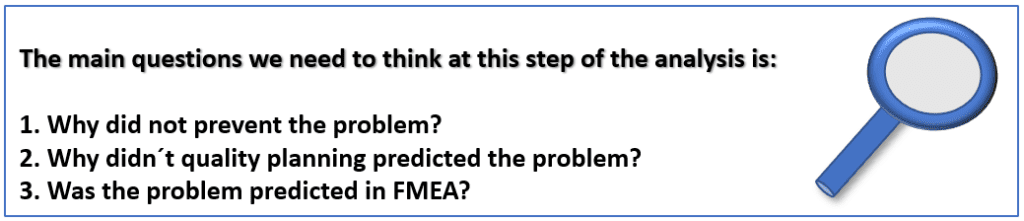
- Systematic Root Cause – Why did not prevent the problem?

And here we have an additional information that will aggregate your analysis, that is “validate” the correlate among the problem , the 5 whys and the root cause.
As soon as you start asking the questions and get the answers, as soon as you detect the root cause (last answer you get) you will return adding 5 therefore in order to “validate” the answers obtained in the analysis.
Doing so will make the analysis more robust to the root cause detected.
Occurrence Root Cause
When we talk about finding the root cause of the occurrence, We starting using 5 whys to identify and understand why that problem occurred, what actually occurred and the reason behind it.
It is important that at the time of analysis we do not confuse it with the other topics that we are yet to analyze, as they are the root cause for not detecting the problem and preventing it.

Detection Root Cause
In the second step, we started the 5 whys to identify why the problem was not previously identified before we send the problem product to the customer.
This topic is strongly correlated with measurement systems or measurement methods that are developed in production environments, which aim to monitor and prevent failures.

Systemic Root Cause
In the third step, we apply the 5 whys to identify why the problem was not prevented before send the problem product to the customer.
This topic is strongly related to planning before starting the production, we can do na analysis on the prevention of the problem based on the FMEA (Failure mode and effects analysis)
Why Why Analysis with application example
Now we will make a practical example of application of the 5 Whys identifying the 3 main causes that can affect us during the manufacture of products in the processes.
To understand how to get to this step of the analysis, I ask you to read our article on the practical application of an 8D model using a practical example on the KIE website 8D Problem Solving
In this post you will be able to understand how to structure an analysis in an 8D model, exploring the 9 steps.
Let’s say you received a complaint from a customer, and initiated a cause analysis based on the 8D methodology. After going through stages D0 / D1 / D2 & D3 you will now start D4 which is the phase of identifying the Root Cause
As presented in our previous post (see the link above), In D4 we have some tools that help us to find the root cause of a problem, for our examples we used the Cause and Effect Diagram and the 5 whys.
Let’s continue with the example…
The complaint from your customer, was delivered an electronic device with the cable, which is not charging the battery. You and your team decided to use Why Why Analysis to find the root cause.
Bellow, we´ll see how this analysis would look using the Why Why Analysis:


We hope you have enjoyed the article on Why Why Analysis report template with example.
Thank you. Hope you have noticed downloadable and editable Why Why Excel template. Go and download it, present before your team and solve your customer complaints.
You may find more Why Why Analysis information here.

Now or Never
We’ve got your back on your manufacturing journey — Stay in touch
Follow us for step-by-step guidance, templates, and insights that save time and reduce mistakes.
Know Industrial Engineering Platform – Helping manufacturing industry professionals worldwide since 2019
Discover more from Know Industrial Engineering
Subscribe to get the latest posts sent to your email.

Honestly, Using RCA in 3 different methods was new to me. Thanks for the article!
Doing RCA with these 3 methods is an holistic approach.
Truly appreciate it